Pricing
Choose a plan based on how many domains, GEOs and campaigns you want to cover. Upgrade or downgrade anytime.
Free trial
Perfect for tests and side projects.
- 8 ASN from any countries
- Duration: 1 week
- Status checks - up to once every 30 minutes
- Basic analytics (limited reports)
- No rollover when upgrading to paid plans
Standard
Best for active brands.
- 28 $ / month per ASN
- Status checks - up to once every 30 minutes
- Full freedom to choose countries and ISPs
- ASN can be re-assigned between countries at any time
- Standard analytics included
Pro
For business-critical monitoring.
- 32 $ / month per ASN
- Faster status checks - up to once every 5 minutes
- Full ISP and country flexibility
- Historical performance data
- Detailed incident reports
Business
Fixed pack for high-volume monitoring.
- 100 ASNs fixed · $24 per ASN
- Faster status checks - up to once every 5 minutes
- Full ISP and country flexibility
- ASN can be re-assigned between countries at any time
- Standard analytics included
Business 250
Maximum coverage for enterprise scale.
- 250 ASNs fixed · $20 per ASN
- Faster status checks - up to once every 5 minutes
- Full ISP and country flexibility
- ASN can be re-assigned between countries at any time
- Standard analytics included
How billing works
Uptrixia pricing is based on how many ASNs you run checks from. Choose the amount, confirm terms, and pick how the purchase should be applied.
Choose ASN amount
Select how many ASNs you want to add. Each ASN can be configured to the GEO/ISP you need.
Confirm terms
Accept Terms & Conditions and confirm payment and renewal settings.
Apply purchase
Choose whether new ASNs extend your current subscription or start a new cycle today.
Add to current plan
Adds ASNs into your current billing period. If you purchased yesterday and add more today, the system recalculates so everything stays aligned to the original plan start date - your cycle still ends on the same day as the plan you already had.
- Best when you want one shared renewal date
- Keeps billing simple for accounting
- Great for adding capacity mid-cycle
Extend to new one
Starts a new subscription cycle from the purchase date (today). Use this when you want the added ASNs to have a separate cycle aligned to the new order date.
- Best when you want a fresh cycle from today
- Useful for new projects or separate budgeting
- Keeps old plan unchanged
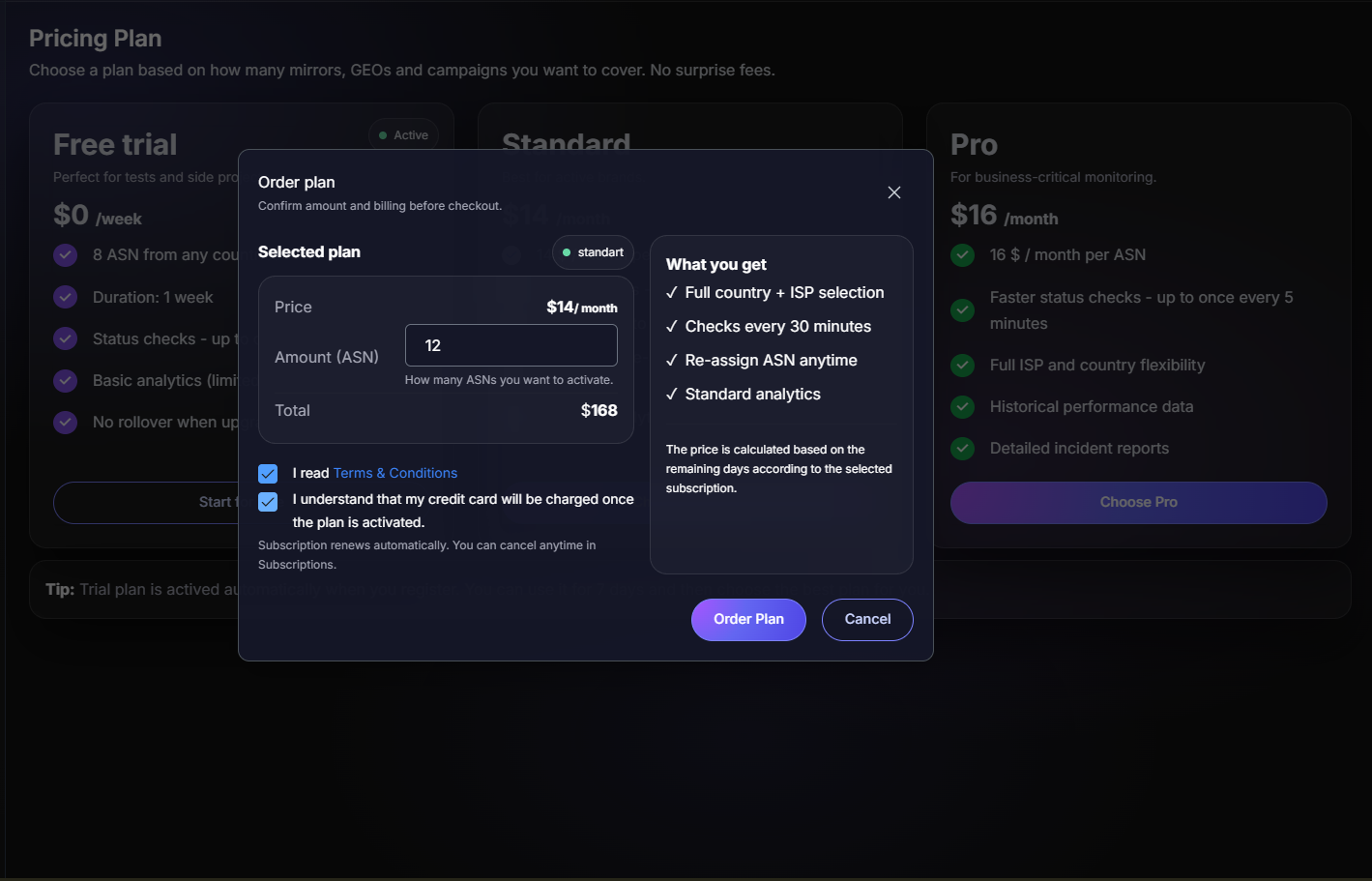
Order flow preview
In the order modal you’ll see selected plan details, price and total amount. Before payment, you can confirm automatic subscription renewal.
Billing History
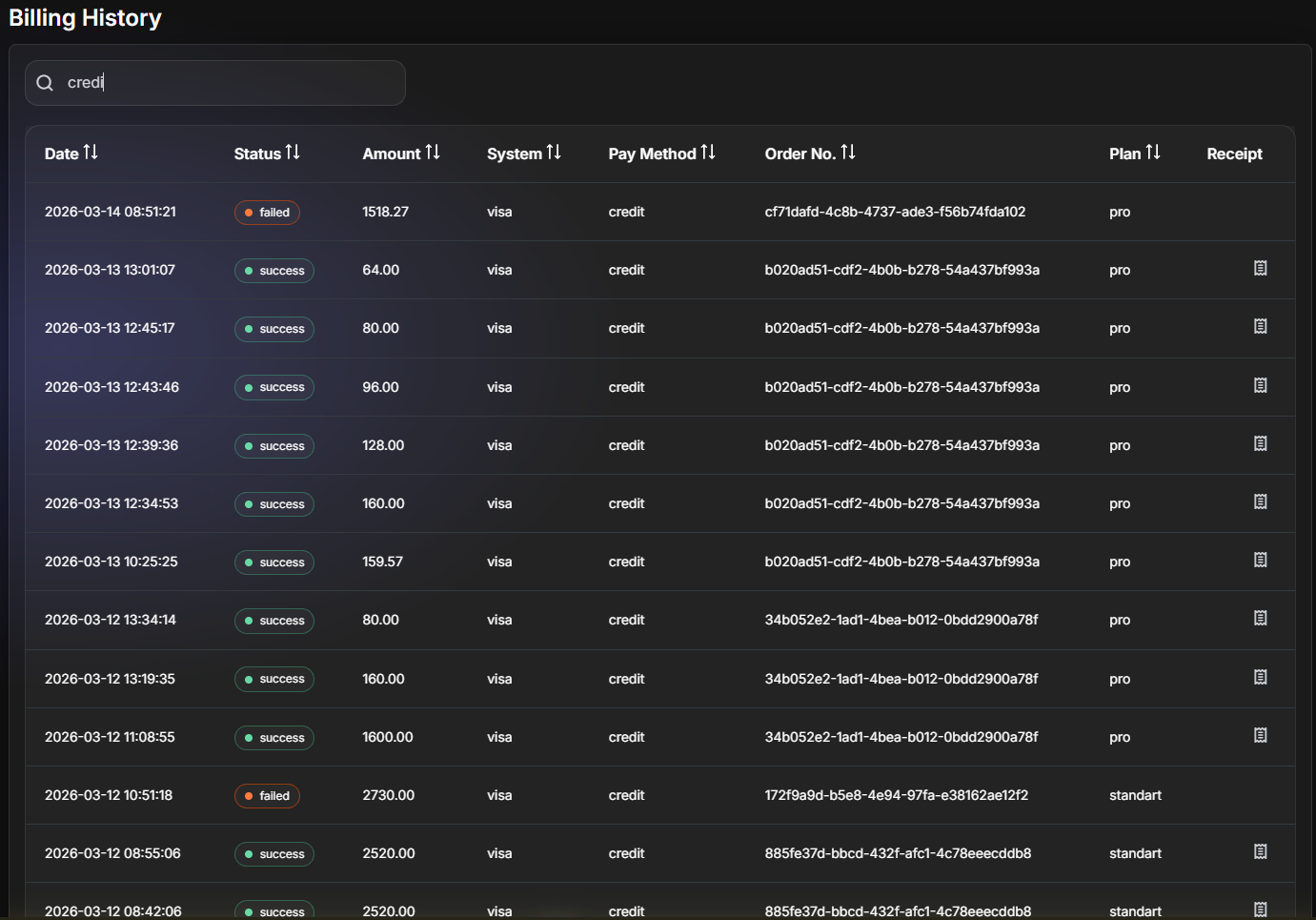
Every payment attempt and subscription update is logged in one place - helpful for finance and support.
- Date
- Status (success / failed / cancel / in process)
- Amount
- System
- Pay method
- Order No.
- Plan
- Receipt (when available)
Subscriptions History
All your subscriptions are listed in one place - past and active. This view shows exactly when each plan started, when it ends, and how many ASNs were included.
- Start and end date
- Plan type
- Number of ASNs
- Current status
- Cancel active subscription instantly
- Pay or extend without contacting support
- No manual invoices or emails
Active subscriptions can be paid or cancelled in one click, giving you full control without waiting for billing support.